

Adobe Stock: Unlock Premium Assets for Your Creative Projects
As digital content creators, we’re always on the lookout for high-quality assets to enhance our projects. That’s where Adobe Stock comes in, offering a vast library of images, videos, and graphics to suit every creative need.
We’ve found that Adobe Stock stands out from other stock content providers due to its seamless integration with Adobe Creative Cloud applications. This powerful synergy allows us to streamline our workflow and access millions of assets directly within our favorite design tools. Whether we’re working on a branding campaign, a website redesign, or a video production, Adobe Stock provides the resources we need to bring our visions to life efficiently and effectively.
Key Takeaways
- Adobe Stock offers a vast library of over 200 million high-quality images, videos, and 3D assets for content creators
- Seamless integration with Adobe Creative Cloud applications streamlines workflow for designers and marketers
- Advanced AI-powered search tools and curated collections make finding the perfect asset quick and efficient
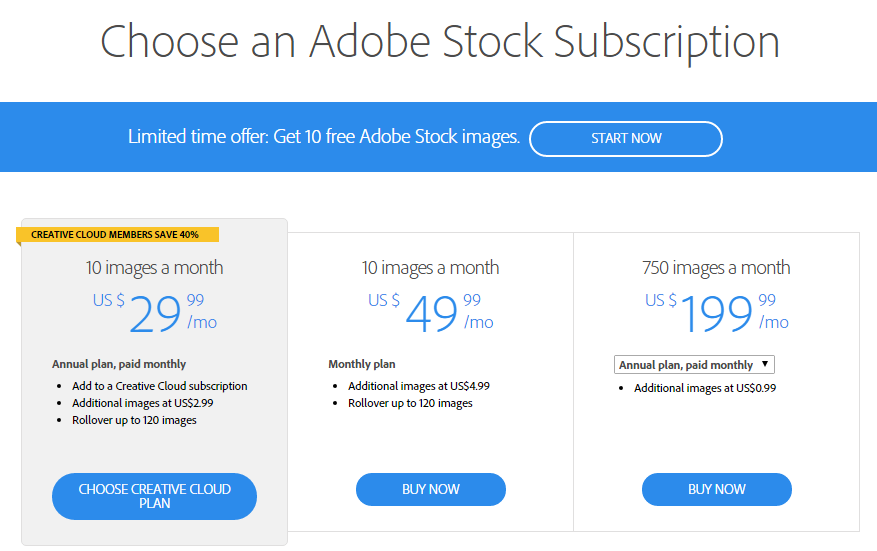
- Flexible pricing plans and licensing options cater to individual creators, small businesses, and enterprise needs
- All content is legally licensed for commercial use, ensuring protection from copyright issues
- Adobe Stock prioritizes diversity and inclusivity in its content offerings, representing various demographics
What Is Adobe Stock?
Adobe Stock is a premium digital asset marketplace offering millions of high-quality images, videos, templates, and 3D assets for content creators and businesses. It’s an integral part of the Adobe Creative Cloud ecosystem, providing seamless integration with popular design applications like Photoshop, Illustrator, and InDesign.
Unlike free platforms such as Google Images, Adobe Stock ensures all its content is legally licensed for commercial use. This protects creators from potential copyright issues while providing them with professional-grade assets for their projects.
Adobe Stock’s vast library includes:
- Photos: Over 200 million stock images covering various subjects and styles
- Vectors: Scalable graphics for logos, icons, and illustrations
- Videos: 4K and HD footage for video production needs
- Templates: Ready-to-use designs for social media, presentations, and more
- 3D assets: Models, materials, and lights for 3D projects
Content creators benefit from Adobe Stock’s advanced search features, including visual search and AI-powered filters. These tools help users find the perfect assets quickly, streamlining their creative process and enhancing productivity.
Key Features of Adobe Stock

Adobe Stock offers a comprehensive suite of features designed to meet the diverse needs of content creators. Let’s explore some of its standout capabilities that set it apart from other stock content platforms.
Extensive Image Library
Adobe Stock boasts an impressive collection of over 200 million high-quality images, catering to a wide range of creative needs. This vast library includes:
- Professional photographs
- Illustrations and vector graphics
- Editorial images
- 3D renders and textures
Content creators can easily find the perfect visuals for their projects, whether they’re working on web design, marketing materials, or print publications. The library’s diversity ensures that creators can find unique and relevant images that align with their brand identity and messaging.
Video and Audio Assets
In addition to its extensive image library, Adobe Stock provides a rich selection of video and audio assets:
- 4K and HD video footage
- Motion graphics templates
- Background music tracks
- Sound effects
These assets enable content creators to enhance their multimedia projects with professional-grade elements. Whether it’s adding dynamic b-roll to a promotional video or finding the perfect soundtrack for a presentation, Adobe Stock’s video and audio offerings cater to various creative needs.
Integration with Adobe Creative Cloud
One of Adobe Stock’s most powerful features is its seamless integration with Adobe Creative Cloud applications. This integration offers several benefits:
- Direct access to Adobe Stock within Creative Cloud apps
- Ability to preview watermarked assets in projects before purchase
- Automatic syncing of licensed assets across devices
- Easy replacement of low-resolution comps with high-resolution files
By integrating with popular tools like Photoshop, Illustrator, and Premiere Pro, Adobe Stock streamlines the creative workflow, allowing content creators to search, preview, and license assets without leaving their preferred applications. This tight integration saves time and enhances productivity, making it an invaluable resource for professionals working on time-sensitive projects.
Pricing Plans and Licensing Options

Adobe Stock offers flexible pricing plans and licensing options to suit various content creation needs. We’ll explore the different licenses available and how they cater to different usage requirements.
Standard License
The Standard License is Adobe Stock’s basic licensing option, ideal for most content creators. It allows for broad usage rights, including:
- Unlimited digital reproductions
- Print runs up to 500,000 copies
- Use in marketing and advertising materials
- Incorporation into social media posts and websites
This license covers most typical use cases for Adobe Stock content, making it suitable for freelancers, small businesses, and content creators working on diverse projects. The Standard License protects users from copyright issues while providing access to millions of high-quality assets.
Enhanced License
For projects requiring extended usage rights, Adobe Stock offers the Enhanced License. This option provides additional benefits:
- Unlimited print runs
- Use in merchandise and products for resale
- Incorporation into templates or on-demand applications
- Higher indemnification coverage
The Enhanced License is particularly valuable for large-scale marketing campaigns, product packaging, and projects involving mass distribution. It offers content creators greater flexibility and peace of mind when using Adobe Stock assets in more expansive or commercial contexts.
Quality of Adobe Stock Content
Adobe Stock’s content quality sets it apart from other stock image platforms. We’ll explore the high standards maintained in image resolution and quality, as well as the platform’s commitment to diversity and inclusivity.
Image Resolution and Quality
Adobe Stock ensures that all images meet professional standards for resolution and quality. Content creators can access high-resolution images suitable for various applications, from digital to print. Unlike free alternatives like Google Images, Adobe Stock provides:
- Images with a minimum resolution of 4 megapixels
- Vectors that scale without loss of quality
- 4K and HD video content for professional productions
The platform’s strict quality control process ensures that only the best content makes it to the library, maintaining a consistently high standard across all asset types.
Diversity and Inclusivity
Adobe Stock prioritizes diversity and inclusivity in its content offerings. This commitment is evident in:
- Representation of various ethnicities, ages, body types, and abilities
- Authentic portrayals of different cultures and lifestyles
- Gender-balanced imagery across professional and personal contexts
By providing a wide range of diverse content, Adobe Stock enables content creators to produce more inclusive and representative work. This approach sets it apart from some competitors and free options, making it a valuable resource for creating content that resonates with diverse audiences.
Search and Discovery Tools

Adobe Stock offers powerful search and discovery tools that streamline the process of finding the perfect assets for content creators. These tools leverage advanced technologies to enhance the user experience and improve productivity.
AI-Powered Search
Adobe Stock’s AI-powered search capabilities revolutionize how content creators find assets. The platform utilizes machine learning algorithms to understand visual content and context, enabling more accurate and relevant search results. Users can:
- Search by image: Upload a reference image to find visually similar assets
- Use natural language processing: Enter descriptive phrases for more intuitive searches
- Filter by visual attributes: Narrow results based on color, composition, and style
- Discover similar content: Explore related assets based on selected images
These AI-driven features significantly reduce search time, allowing content creators to focus on their creative process.
Curated Collections
Adobe Stock’s curated collections offer handpicked assets organized by themes, styles, and trends. These collections provide:
- Trend-focused groupings: Access the latest visual trends in design and photography
- Industry-specific selections: Find assets tailored to specific sectors like technology or healthcare
- Seasonal compilations: Discover content relevant to holidays, events, and time-sensitive topics
- Diverse representation: Explore collections featuring inclusive imagery across various demographics
By leveraging these curated collections, content creators can quickly find high-quality assets that align with their project needs and stay current with visual trends.
Adobe Stock for Businesses
Adobe Stock offers tailored solutions for businesses of all sizes, providing enterprise-level access to high-quality creative assets. We’ll explore how Adobe Stock’s enterprise solutions and team libraries can streamline content creation and boost productivity for organizations.
Enterprise Solutions
Adobe Stock’s enterprise solutions provide businesses with comprehensive access to millions of high-quality assets. These solutions offer:
- Customized licensing agreements to meet specific business needs
- Simplified asset management across large teams
- Integration with existing digital asset management systems
- Advanced rights management and usage tracking
- Dedicated account support for seamless implementation
Enterprise customers benefit from bulk licensing options, allowing them to acquire large volumes of assets at competitive rates. This approach is particularly cost-effective for organizations with extensive content creation needs.
Team Libraries
Adobe Stock’s team libraries feature enhances collaboration and maintains brand consistency across departments:
- Centralized asset management for easy access by team members
- Custom collections of pre-approved assets for brand alignment
- Shared licenses to maximize resource utilization
- Streamlined workflows with Creative Cloud integration
- Version control and asset tracking for efficient project management
Team libraries enable content creators to quickly find and use approved assets, reducing time spent searching for appropriate images or videos. This feature is especially valuable for businesses looking to maintain a cohesive visual identity across various marketing channels.
By leveraging Adobe Stock’s enterprise solutions and team libraries, businesses can significantly improve their content creation processes, ensuring high-quality, on-brand assets are readily available to their creative teams.
Comparing Adobe Stock to Competitors
Adobe Stock stands out in the competitive landscape of stock image platforms, offering unique advantages for content creators. We’ll compare Adobe Stock to some of its major competitors to highlight its strengths and potential drawbacks.
Adobe Stock vs. Shutterstock
Adobe Stock and Shutterstock are both leading players in the stock image market. While Shutterstock boasts a larger library with over 350 million assets, Adobe Stock’s integration with Creative Cloud applications gives it an edge for Adobe users. This seamless workflow allows content creators to access and edit images directly within their preferred design tools.
Adobe Stock vs. Getty Images
Getty Images is known for its high-quality, exclusive content, often featuring editorial and news images. Adobe Stock, while offering a broad range of professional-grade assets, focuses more on commercial and creative content. Getty’s pricing tends to be higher, making Adobe Stock a more cost-effective option for many content creators.
Adobe Stock vs. iStock
iStock, owned by Getty Images, offers a similar range of assets to Adobe Stock. However, Adobe Stock’s integration with Creative Cloud and its AI-powered search capabilities make it more appealing to Adobe users and those seeking advanced search functionality.
Adobe Stock vs. Depositphotos
Depositphotos offers a free trial, which can be attractive for new users. However, Adobe Stock’s quality control and integration with Adobe’s ecosystem often make it a preferred choice for professional content creators who prioritize seamless workflows and high-quality assets.
Adobe Stock vs. Unsplash
Unsplash provides free stock photos, which can be tempting for budget-conscious creators. However, Adobe Stock’s licensed content ensures legal protection and often higher quality, making it a safer choice for commercial projects.
Adobe Stock vs. Google Images
While Google Images is a popular source for visual inspiration, it’s not a dedicated stock image platform. Adobe Stock offers properly licensed, high-quality content specifically designed for commercial use, reducing legal risks and ensuring professional standards.
| Feature | Adobe Stock | Competitors |
|---|---|---|
| Integration with Adobe Creative Cloud | Yes | Limited or None |
| AI-powered search | Advanced | Varies |
| License types | Standard and Enhanced | Varies |
| Free trial | Yes (limited) | Varies |
| Enterprise solutions | Yes | Limited |
While each platform has its strengths, Adobe Stock’s seamless integration with Creative Cloud, high-quality assets, and advanced search capabilities make it a top choice for content creators, particularly those already using Adobe’s suite of creative tools.
Pros and Cons of Adobe Stock

Pros
- Seamless integration: Adobe Stock’s integration with Creative Cloud applications streamlines workflow for content creators.
- Extensive library: Over 200 million high-quality assets, including images, videos, and 3D content, cater to diverse project needs.
- Legal licensing: All assets are legally licensed for commercial use, protecting content creators from copyright issues.
- Advanced search tools: AI-powered filters and visual search capabilities make finding the perfect asset quick and efficient.
- Flexible pricing: Various plans and licensing options accommodate different budgets and usage requirements.
- Enterprise solutions: Customized licensing agreements and dedicated support for large-scale business needs.
- Team libraries: Centralized asset management enhances collaboration and maintains brand consistency across departments.
- High-quality content: Strict standards for image resolution and quality ensure professional-grade assets.
- Diversity and inclusivity: A focus on representing various demographics in stock content.
- Cost: Pricing may be higher compared to some competitors, especially for individual creators or small businesses.
- Learning curve: New users might need time to navigate the platform’s extensive features and integration capabilities.
- Overwhelming choices: The vast library can sometimes make it challenging to find the perfect asset quickly.
- Adobe ecosystem dependency: Maximum benefits are realized when used within the Adobe Creative Cloud ecosystem.
- Limited free options: Unlike platforms like Unsplash or certain aspects of Google Images, Adobe Stock offers minimal free content.
- Subscription model: Some users may prefer pay-as-you-go options over subscription-based plans.
- Content exclusivity: Some unique or highly sought-after content may be available on other platforms.
- Update frequency: While the library is extensive, update frequency for certain niche categories may vary.
Conclusion
Adobe Stock stands out as a powerful resource for content creators seeking high-quality digital assets. We’ve explored its extensive library seamlessly integrated with Creative Cloud applications enhancing workflow efficiency. The platform’s advanced search tools AI-powered filters and curated collections streamline asset discovery. With flexible pricing plans and enterprise solutions Adobe Stock caters to individual creators and large organizations alike. While it may have a steeper learning curve and higher pricing for some users its benefits in terms of quality licensing and integration make it a top choice for professionals committed to creating outstanding content.

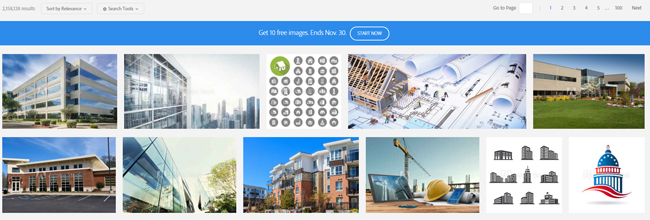
 Adobe Stock is one of the best stock photo websites in the market. It has over 50 million high quality, royalty-free images, illustrations, graphics and videos in its library. Curated by Adobe, it is directly integrated with Adobe Creative Cloud desktop applications so you can purchase, access and manage your images more easily and quickly. All you have to do is find the perfect photo to create the most amazing project.
 Is Adobe Stock free? The answer is absolutely yes. Get this very rare opportunity to access a world-class collection without commitment. Get your 10 images for free and create the most amazing creative projects with them. If you are using a Creative Cloud application, this is the best time for you to get your subscription. Click the link above and start your free month now!